
Digital Legacy Tree Reader Resources
Supporting templates, checklists, worksheets, and companion resources for readers of The Digital Legacy Tree.
For readers of The Digital Legacy Tree book, you can find templates for the items mentioned in the book below, and ask questions or submit comments.
Start Here
New to The Digital Legacy Tree?
If you’ve finished the book and aren’t sure where to begin, follow these steps:
1. Download the companion workbook
Start by creating basic records for your three most critical assets. The workbook contains working copies of all of the templates listed below.
Download: The Digital Legacy Tree Companion Workbook (HERE)
2. Start your first usable Digital Legacy File
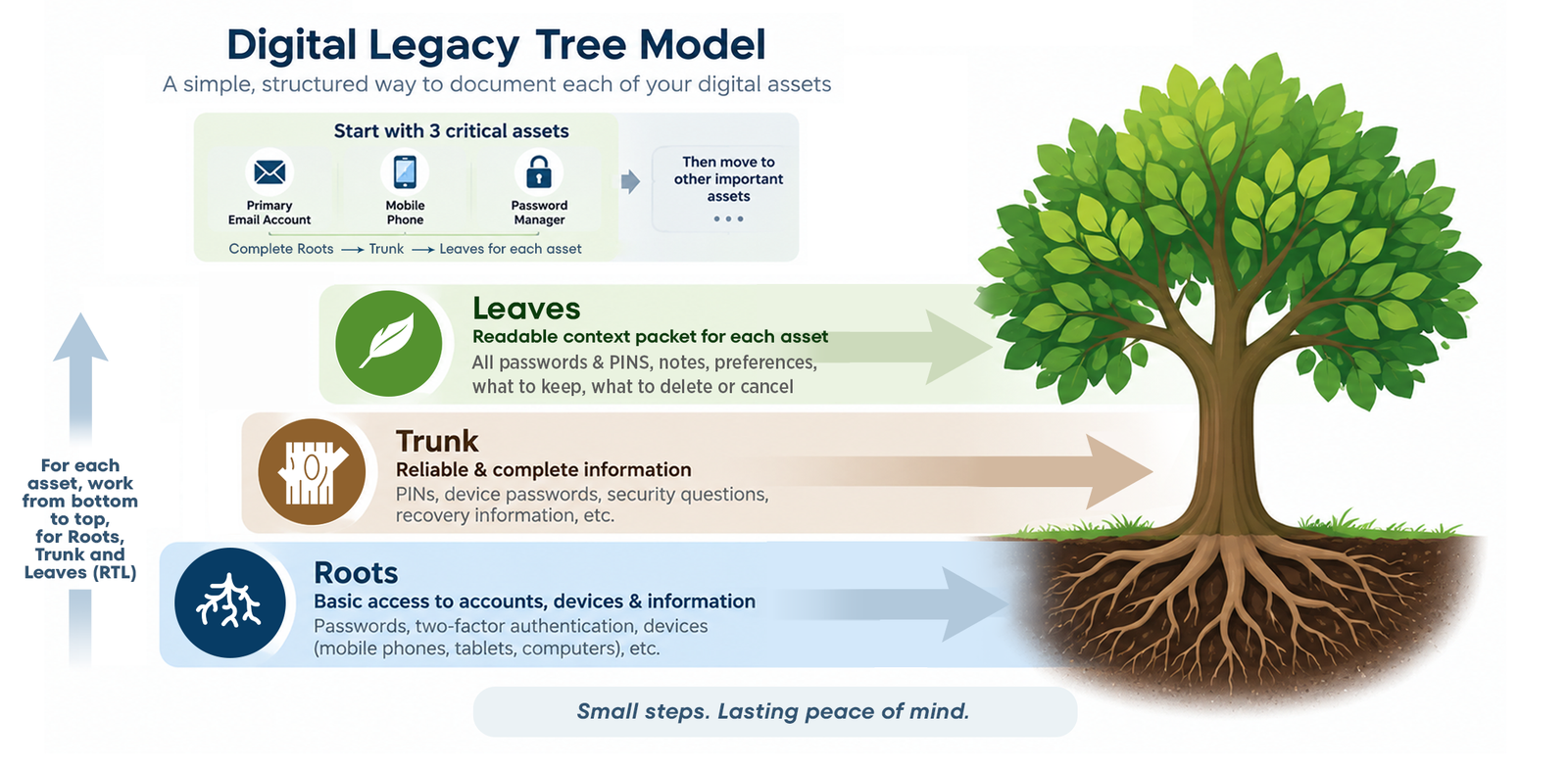
Identify your top 3 critical assets and document them first using the suggested DLF structure with three levels of detail for Roots, Trunk and Leaves.
Download: DLF Template (HERE)
3. Use the digital asset discovery table
Find your digital assets by reviewing the full listing of suggested categories and asset types to find things most people forget about. Then prioritize them to make sure the most important ones are documented first.
Download: Digital Asset Discovery Inventory Listing (HERE)
4. Expand your initial Digital Legacy File into a robust, living document
Enhance and expand your DLF using the simple steps you used to create your first few critical asset records. Grow the DLF based on your top priority assets until your prioritized assets are all documented. You can also modify the DLF to meet your needs.
5. Create a Digital Trailhead
Make it easy for your authorized decision-maker to locate your DLF with a clear and simple email or document that gives them a starting point that they should know about as soon as your DLF is completed.
Download: Digital Trailhead Template (HERE)
6. Schedule your first review
Test the process and create a recurring maintenance schedule.
Download: Annual Review Checklist (HERE)
Don’t put your executor or authorized decision-makers through the frustration of not being able to access critical online assets in an unexpected situation.
This resource page supports anyone preparing dealing with digital legacy challenges, whether you are just starting to think about estate planning, or have been worrying for some time about what will happen to your accounts and digital assets after you die.
Check out the resources on this page to learn more about why “digital legacy planning” means more than just having a list of passwords you assume your loved ones will find, and get some quick tips that will simplify the process of granting access to major platforms like Apple, Google and Microsoft.
An even better way to keep your momentum going, and to stay plugged into my tools and tips is to sign up for my newsletter updates. Just fill in the form on the right, and you’ll receive my regular news with practical insights…
Keep Your Momentum Going
It can be hard to keep going without reminders.